DAW / Audio#
Reaper#
What is JSFX?#
It's a programming language for creating audio plugins that was originally only compatible with Reaper. In Reaper, plugins code can be edited on the fly, which is pretty unique in this field.
Most plugins are open-source and often don't have a pretty interface.
It is now possible to run them in various DAWs thanks to software that provides a compatibility layer.
I discovered this late in the game and regret it very much, because there are some really great plugins that are completely portable, light and compatible with all operating systems.
Attached is a list of sources to add to Reapack (package manager for Reaper) and my essentials.
Reapack#
ReaPack is a package manager for REAPER compatible with Windows, macOS, and Linux (x86_64 and ARM). It allows users to easily browse, install, update, and manage scripts, extensions, presets, effects, and other resources created by the REAPER community.
Instead of manually downloading scripts from forums or GitHub repositories, ReaPack centralizes the process and makes it much easier to keep tools up to date.
ReaPack is popular among REAPER users because it gives access to a large ecosystem of community-made tools that can greatly extend REAPER’s functionality without having to pay for commercial plugins that are way too expensive and are riddled with DRM.
Reapack custom source#
https://reapack.com/index.xml
https://github.com/ReaTeam/ReaScripts/raw/master/index.xml
https://github.com/ReaTeam/JSFX/raw/master/index.xml
https://github.com/ReaTeam/Themes/raw/master/index.xml
https://github.com/ReaTeam/LangPacks/raw/master/index.xml
https://github.com/ReaTeam/Extensions/raw/master/index.xml
https://github.com/MichaelPilyavskiy/ReaScripts/raw/master/index.xml
https://github.com/X-Raym/REAPER-ReaScripts/raw/master/index.xml
https://raw.githubusercontent.com/Justin-Johnson/ReJJ/master/index.xml
https://github.com/Bird-Bird/JSFX/raw/main/index.xml
https://github.com/chmaha/airwindows-JSFX-ports/raw/main/index.xml
https://github.com/chkhld/jsfx/raw/main/index.xml
https://github.com/Erriez/erriez-reaper-jsfx/raw/master/index.xml
https://geraintluff.github.io/jsfx/index.xml
https://github.com/IXix/JSFX/raw/master/index.xml
https://raw.githubusercontent.com/juanriccio/Reaperism/master/index.xml
https://raw.githubusercontent.com/JoepVanlier/JSFX/master/index.xml
https://raw.githubusercontent.com/TukanStudios/TUKAN_STUDIOS_PLUGINS/main/index2.xml
https://raw.githubusercontent.com/mawi-design/JSFX/main/index.xml
https://github.com/JClones/JSFXClones/raw/master/index.xml
https://github.com/chmaha/ReaClassical/raw/main/index.xml
https://raw.githubusercontent.com/DocShadrach/MyReaperFXs/master/index.xml
https://raw.githubusercontent.com/iliaspoulakis/Reaper-Tools/master/index.xml
https://raw.githubusercontent.com/Sonic-Anomaly/Sonic-Anomaly-JSFX/refs/heads/master/index.xml
https://raw.githubusercontent.com/uncleosmixing/ReaScripts/main/index.xml
Essential:
- SWS Extension
- The GOAT of all Reaper extensions (try snapshot)
- REEQ
- Fabfilter Pro-Q style EQ without dynamic
- JClones series
- Clones of well-known plugins (such as the Oxford Inflator & Pro L2)
- ReaVision "RCPlugs"
- An all-in-one place for loudness/true peak read-outs, K-meters, goniometer, phase correlation meter, bit meter, spectrum analyzer and spectrogram.
- The Hot Summer
- 16-Ch Analog-Like Summing Engine
- It's a little of a hassle to set up the first time, but it's really fun !
- Room Control Center
- The perfect tool for mixing with headphones
- Monitoring controls, loudness metering, visual analyzers, reference playback, and headphone correction (from autoeq) into one compact window.
- Uses the technology and algorithms of Airwindows Monitor 3 and BS2B
- REAPER Update Utility
- A simple utility that automates the REAPER update/installation process.
- After install :
Reaper → Actions → Show actions list → Script: REAPER Update Utility.lua → Run → options → Startup notification → Run script on startup - Ideally, you should disable the Reaper update check in the Reaper options.
- You can disable RC and beta version checks and check the box to ensure that the script runs only when a new version is available.
Reaper tips#
Monitoring FX#
The FX monitoring feature allows you to apply effects only to the main monitor (outputs 1 & 2). These effects will not be present on the other outputs or in exports. Monitoring FX are not linked to projects.
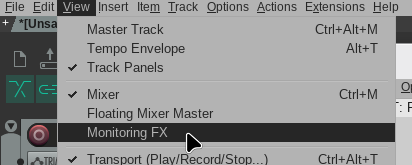
This is the perfect solution for applying room correction EQ/IRs !
IR in Reaper#
IRs are as mysterious as they are magical. I can’t explain exactly how they work, but I can tell you one thing: They’re awesome.
Basically, they’re very complex filters in the form of a WAV file with a limited number of samples (512, 1024, 2048...). When you listen to them, they sound like nothing more than a very short “click.” This click can be interpreted by certain software as an extremely complex filter (convolution).
If you want more information on how they work, check out the Wikipedia page.
IRs are absolutely great for three things:
- Simulating guitar speakers
- Correcting an audio system (headphones and speakers).
- Reverberation
I'll write a bit more about how to do this yourself a little later in a different category. I've been playing with REW a bit and I need to write all that down here.
Reaverb#
Reaverb is a convolution reverb plugin built into Reaper.
It allows you to load reverb impulse responses to simulate natural reverberation. It can also load room correction IRs, guitar cab IRs and even create IRs!
You can put it in Monitoring FX to apply headphone and room correction IRs
If you're using it to make room correcting or guitar cab IRs, you should obviously turn the “dry” knob all the way down.
Be careful, some IRs can boost the volume pretty hard, so it's best to turn down the “wet” knob to test the IR before destroying your hardware.
Headphone correction Easily and for Free#
There's a wonderful website called autoeq.app
AutoEq.app is a website that lets you find and apply EQ corrections for many models of headphones and earbuds.
It uses frequency response measurements to suggest EQ settings designed to make the sound more neutral or closer to a target curve.
You can search for your headphone model and retrieve parametric, graphic EQ settings or *impulse response files that can be used in Reaverb. It’s a handy tool for correcting a headphone’s sound signature.
Harman over-ear 2018, Convolution EQ, and ho boi, you're going to rediscover your headphones.
From experience, this works really well with headphones, but much less so with earbuds.
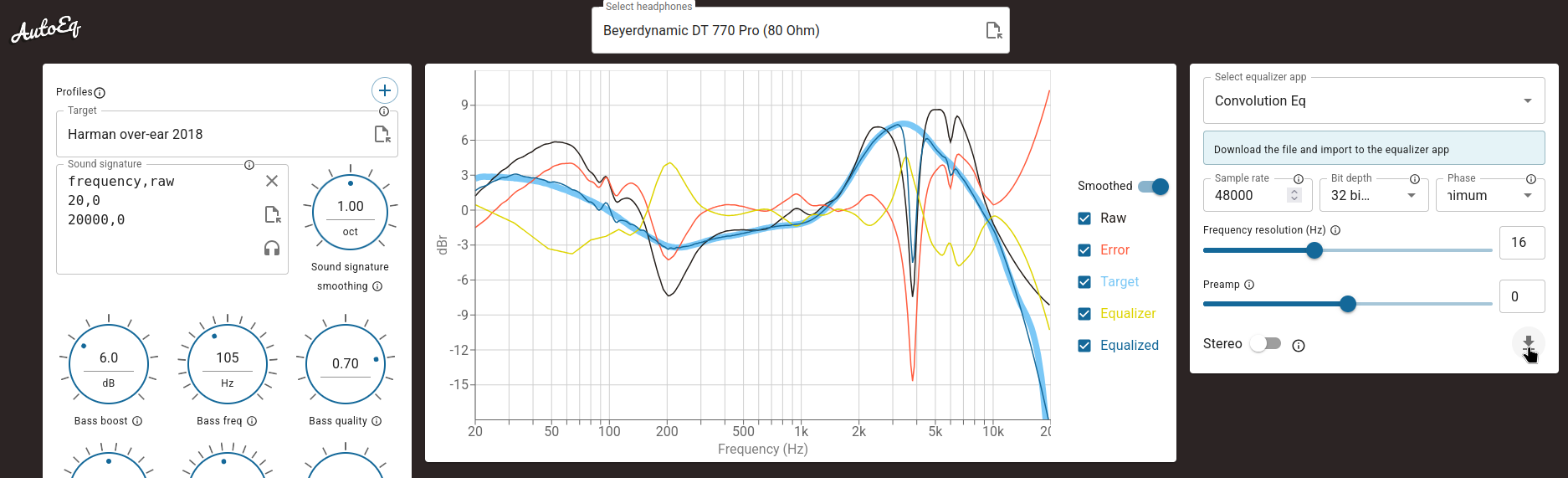
Personally, I think this solution works better than "SoundID Reference".
Folder in the mixer#
By right-clicking in an empty area of the mixer, you can enable clickable folders in the mixer.
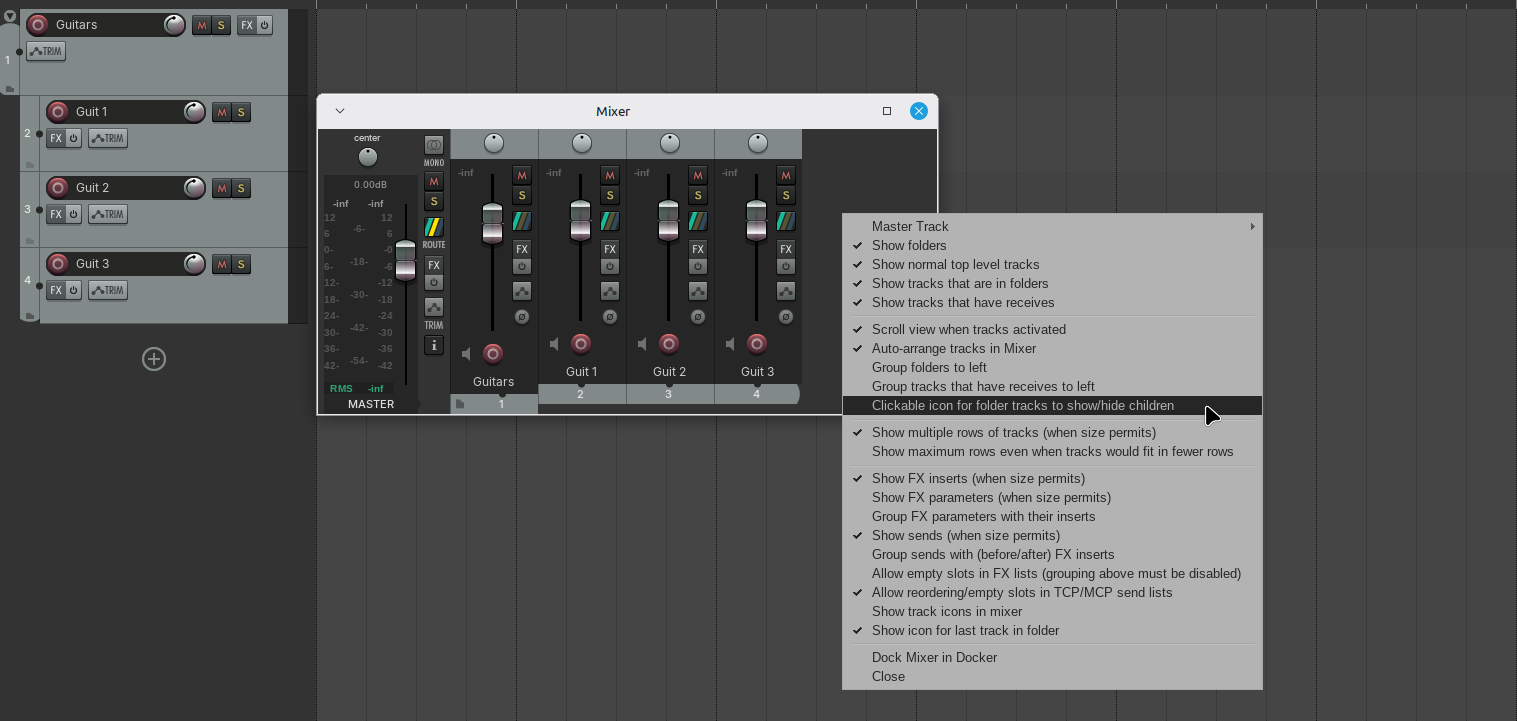
This helps keep complex projects a little cleaner.
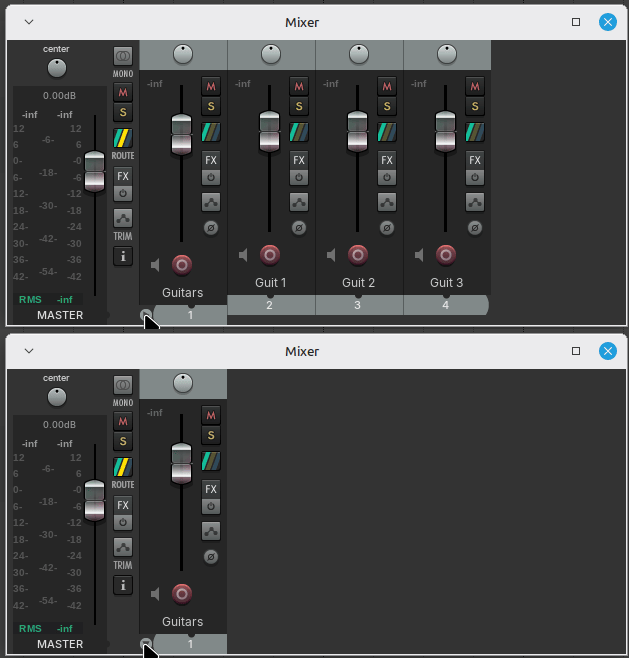
Linux#
Why use Reaper with Linux?#
Windows has become a total mess over the years, and it’s not getting any better. Nothing has been as perfect as Windows 7, and everything that’s come after it is just a heavier, buggy version with more user tracking and backdoors. For a huge number of tasks, there’s really no good reason to stick with Windows.
However, other operating systems are far from perfect either. Linux can be extremely complicated, user-unfriendly, with major hardware compatibility issues, limited native software support. MacOS is following in Windows’ footsteps in terms of bloat, with an OS that’s becoming increasingly vibecoded.
In my case, I’ve ditched Windows on my main x86 machine and now use only Linux on a daily basis. For standard tasks like web browsing, watching videos and office, it works perfectly for me (and it's so damn fast). I first experimented with audio on Linux a few years ago and found it suitable for quite a few tasks. I can’t say that 100% of my workflow is compatible, since almost all commercial VSTs aren’t natively compatible with Linux. There are ways to run certain VSTs on Linux (documented below), but it’s really not stable.
However, when it comes to tracking (pure and simple audio recording), I haven’t found anything better. It’s incredibly fast, stable, and has the lowest latency. You do need compatible hardware, though.
Depending on what you’re looking for, it’s definitely worth at least trying Reaper on Linux if you don’t use too many commercial VSTs that can’t be replaced by native Linux or JSFX equivalents.
Fun fact#
I was able to conduct some very promising recording tests with Reaper on an 8GB Raspberry Pi 5. It’s tiny and uses almost no power. However, I wasn’t able to lower the buffer size enough to achieve low latency monitoring without crackling. But, you can imagine recording rehearsals with a compatible interface (any class compliant audio interface) and an ADAT preamp (like the ADA8200) or connecting it to an M32/X32/Wing via USB to record a live performance in multitrack for example. If the buffer is high enough, it works like a charm.
Windows VST on Linux#

Disclaimer: It stinks like shit#
This message comes from a man who spent two weeks battling with Waves Central and the V16 plugins, only to watch his project crash spectacularly the very moment he finally got everything installed and "working". : Just because you can doesn't mean you should.
Using Windows VSTs on Linux with Wine is very unstable when using many plugins and is 3x slower than on Windows. Audio / DAW on Linux is really great with very low latency, but only if you're not using Windows VSTs... If you need to use a lot of Windows VSTs or open audio projects made on macOS or Windows full of non-Linux-compatible VSTs, you're 100x better off installing a Windows dual boot. It's not worth the hassle.
I would still like to thank the entire Yabridge / Wine / Bottles dev teams for their incredible dedication. With a little luck, we will one day be able to do without Windows, given its current pitiful slop state.
If only audio plugins developers would compile for Linux...
Yabridge#
Yabridge is a compatibility layer for native Linux DAWs (such as Reaper, Bitwig, Ardour) and Windows plugins running in Wine.
Bottles#
Using Bottles with Yabridge is a solid approach. Bottles allows you to create separate "containers" (bottles, duh !) with your preferred Wine version.
There's a display issue in VST window affecting versions 9.22 and later (the last fully compatible version is 9.21 with Yabridge 5.1.1). Patches are available to address this, though I haven't tested them personally.
While Bottles doesn't rely on winetricks, you can install dependencies directly through its interface, which is quite convenient.
However, due to certain bugs, some dependencies need to be set to "integrated then native" mode. You can configure this in Bottles → Tools → Old Wine Tools → Configuration → Library.
This script solves many problems if you have Wine installed alongside Bottles. It will cause you problems if you don't but the github page still contains a lot of help for using Yabridge with Bottles.
- Wine versions :
- kron4ek-wine-9.21-staging-tkg-amd64
- Error "13"
You little bastard- oleaut32 -> integrated then native
- Powershell crashing
- mscoree -> integrated then native
- Waves Central
- WLE not here
- Copy licences bundle into appdata manually
- Installation failed with no real error messages
- Your plugins pack is problematic. choose Mercury instead.
- Reaper stuck when scanning vcomp VST
- Go to plugin folder (.bundle folder) and remove vcomp.bundle plugin folder.
- WLE not here
Windows#
DPC Latency tweak#
- Windows versions
- Windows 11 IoT Enterprise LTSC 2024
- + Long support (2034) and no furious updates that break everything.
- + Does not have Windows Store
- - Does not have Windows Store or winget
- - Poor support for gaming
- - Some people say it's pointless compared to a traditional version. I can't say they're entirely wrong.
- Windows 11 IoT Enterprise LTSC 2024
- DPC Latency
- Use LatencyMon to find drivers that add a lot of latency.
- Use Microsoft Interrupt Affinity Tool to "move" annoying drivers (looking at you nvidia) to the last CPU core.
- If Nvidia → NVIDIA Control Panel Settings Go to Manage 3D Settings, set "Power management mode" to Prefer Maximum Performance.
- on Reaper : Disable use of the first and last CPU cores
Preferences → General → Advanced UI/system tweaks
Why the first and last CPU? Normally, all tedious processes run on CPU 0. By moving the Nvidia drivers to the last one, you can avoid a lot of problems. However, there are still some shitty processes that remain on CPU 0. Wouldn't it be better not to change the affinity of the Nvidia driver and just avoid CPU 0? Maybe, but I've had better results this way. I think that having all the drivers set to 0 is messing up the USB driver for the sound interfaces (but that's just speculation).
With these tricks, I can go from 24-bit/48 kHz 128 samples buffer with crackling to stable 24-bit/48 kHz 64 samples buffer.
Honestly, I have never understood how a problem that has been present in Windows for 20 years has never been truly resolved and tends to get worse over the years.
Audio Hardware#
The Strange World of Multitrack Recording with More Than 16 Inputs#
I don't know if you've noticed, but when I decided to invest a little money to record my band, I quickly realized that finding a full-featured interface (USB, preamp, output) with more than 8 inputs isn't easy. Unless I'm mistaken, there's only one obscure Zoom interface that allows recording via USB and SD card 16 tracks out of the box.
When I looked into it, I found there’s a pretty annoying limitation. Either you use an 8-input USB interface with ADAT support for 8 additional inputs, or you have to shell out $10,000 for MADI interfaces with line inputs, which means you still have to invest in as many preamps as you have line inputs... I don't have that money, and I never will.
This gap is completely ridiculous, but there are workarounds for getting more than 16 tracks without breaking the bank.
Do not use more than 16 tracks#
It’s still the most cost-effective solution. In fact, a drum kit can easily be recorded on 8 tracks (2x kick, 2x snare, 2x overhead, 2x tom). The other 8 tracks can be used for guitars (2x DI, 4x amp mics), and you’ll still have room for a bass and a vocal mic.
To save tracks, you can also use a DI or a load box between the guitar amp head and the cab to capture a line output that can be processed with IRs. This replaces the two amp mics with just one input.
In a typical rock band setup (vocals, drums, bass, two guitars), this is still perfectly adequate and feasible.
As soon as you start needing to record other instruments, such as a keyboard/synth, the 16 tracks start to feel really tight.
RME Digiface#
This is a 2017 USB sound interface from RME that has recently become “class-compliant” with a firmware upgrade. This term might sound obscure, but it means it's Linux and macOS Plug & Play compatible.
It features 8 ADAT inputs and outputs, allowing you to connect 4 ADA8200 units for a total of 32 inputs and outputs at 48khz / 24 bit (which is more than enough). This is the most cost-effective solution, and RME is known for its highly reliable & ultra low latency hardware.
The RME Digiface costs about 480 CHF / 630 USD~, and the ADA8200s are 150 CHF / 180 USD~ each, for a total of approximately 930 CHF / 1170 USD for 24 input (3x ADA8200) and 1080 CHF / 1350 USD~ for 32 input (4x ADA8200).
To maintain optimal listening quality, you can use 2–3 ADA8200s and a higher-end ADAT converter . The higher-end converter would be used for the main audio output
This is the option that likely offers the lowest latency.
Big digital mixer#
We live in a wonderful world where it's possible to buy a digital mixing console for a reasonable price.
The Behringer X32, Wing, and Midas M32/r are digital mixing consoles that can function as USB audio interfaces.
The cost is significant, and you may experience slightly higher latency when using USB.
For the X32 and M32, there is an ADAT module (Klark Teknik DN32 ADAT) that allows you to connect the console to an RME Digiface for very low-latency audio interface. It's also ideal if you want to use the console live with VSTs in Reaper for example. This module is not available for the Wing.
Prices vary widely depending on where you are and whether you can find a used one.
Here's a short, non-exhaustive list of devices that resemble, in one way or another, a mixing console with multitrack USB recording. I haven't tested all of this equipment, but it should work more or less.
As for the price, the USD rate comes from Sweetwater and the CHF rate is the best price I've found so far without digging too deep (thomann, audiosource, musix...).
| Model | Price CHF | Price USD | Physical XLR input/output |
|---|---|---|---|
| Midas MR18 | 815 CHF | 800 USD | 16/8 |
| Behringer X32 Rack | 669 CHF | 980 USD | 16/8 |
| Behringer X32 Producer | 877 CHF | 1500 USD | 16/8 |
| Behringer X32 Compact | 1059 CHF | 1400 USD | 16/8 |
| Behringer X32 | 1303 CHF | 2000 USD | 32/16 |
| Behringer WING Rack | 1208 CHF | 1800 USD | 24/8 |
| Behringer WING Compact | 2000 CHF | 2800 USD | 24/8 |
| Behringer WING | 2104 CHF | 3500 USD | 8/8 |
| Midas M32R | 1780 CHF | 2500 USD | 16/8 |
| Midas M32 (live) | 2745 CHF | 3300 USD | 32/16 |
As you can see, some mixers are definitely overpriced in CHF (M32 Live). The prices in USD are completely outrageous and are likely due to customs duties.
Note for Linux users : It's always necessary to check for compatibility with our beloved OS. To do that, search online to see if it's class-compliant; if it isn't, it'll be a bit of a gamble...
When looking for a used one, you should also keep in mind that Behringer (which also manufactures Midas) isn't particularly known for its durability... You absolutely must test the mixing console before buying it.
In my opinion, it's not a bad option if you can get your hands on a really inexpensive mixer. Otherwise, I think the basic setup with the ADA8200 is better for a home studio.
SSL 18#
The SSL 18 is one of the very few “affordable” (820 CHF / 1200 USD~) U1 USB rack interfaces with 8 preamp, capable of supporting two ADAT (4 optical connector) expansion modules, providing an additional 16 inputs / 16 outputs for a total of 26 In / 28 Out.
Many USB audio interfaces with four ADAT ports don’t actually provide 24+/- inputs/outputs, but rather allow you to increase the sample rate on 8 adat channels. For 99% of people, this isn’t useful.
In terms of value for money, adding two ADA8200s is a attractive option. You retain top-notch hardware quality with SSL’s excellent DACs, while also benefiting from the affordable (yet highly functional) inputs and outputs of the ADA8200s.
The total cost of this setup is approximately 1120 CHF / 1740 USD for 24 inputs with two ADA8200s, 2460 CHF / 3600 USD~ with three SSL 18.
Top-notch quality... according to this guy on Reddit, not so much if your serial number is lower than S18-200964...
Many of the interface's features must be managed through proprietary software SSL 360, which, of course, is not at all compatible with Linux.
Someone is trying to develop software to control their SSL 12 from Linux. I don't know if it is or will be compatible with the SSL 18.
Recording Above 44.1/48 kHz: Worth It?#
Human hearing nominally spans 20 Hz to 20 kHz, but that upper limit drops with age (presbycusis). Most adults top out around 16–18 kHz by their thirties, and often 12–14 kHz past 50. Noise exposure, common among musicians and engineers, makes it worse.
Sampling theory (Nyquist-Shannon) says a sample rate captures everything up to half its value. So 44.1 kHz covers up to 22.05 kHz and 48 kHz up to 24 kHz, which is already beyond the audible range. Higher rates don't make the sound "smoother"; within the audible band, the reconstructed waveform is identical. They only add ultrasonic content nobody hears.
Listening tests back this up. Meyer and Moran's blind study (AES, 2007) found listeners couldn't tell high-res audio from 16-bit/44.1 kHz. A 2016 meta-analysis by Joshua Reiss found a small effect among trained listeners, but it remains marginal.
Bit depth matters more. Recording at 24-bit gives far more dynamic range and headroom than 16-bit, which is a real benefit in the studio. What's nice is that virtually all audio interfaces designed for recording have supported 24-bit for... 20 years? However, according to classical sound engineer Jean-Claude Gaberel during a presentation in 2016, some older digital recorders lie about their bit depth. I can't remember at all which models he mentioned, but I think he was talking about hardware from the ’80s and ’90s.
Higher rates can help with heavy pitch-shifting or slowing down in sound design, non-linear processing without internal oversampling, slightly lower monitoring latency, or when a client or archive requires it.
But they cost larger files, more CPU load, and potential intermodulation distortion when speakers and amps reproduce ultrasonics. Most mics capture little above 20 kHz anyway.
Bottom line: 24-bit/48 kHz is the sensible standard. 96 kHz has niche uses, and 192 kHz brings almost nothing audible. Your room, mics and performance matter far more than your sample rate.